personal growth
Voice Journal vs Voice Notes: What’s the Difference?
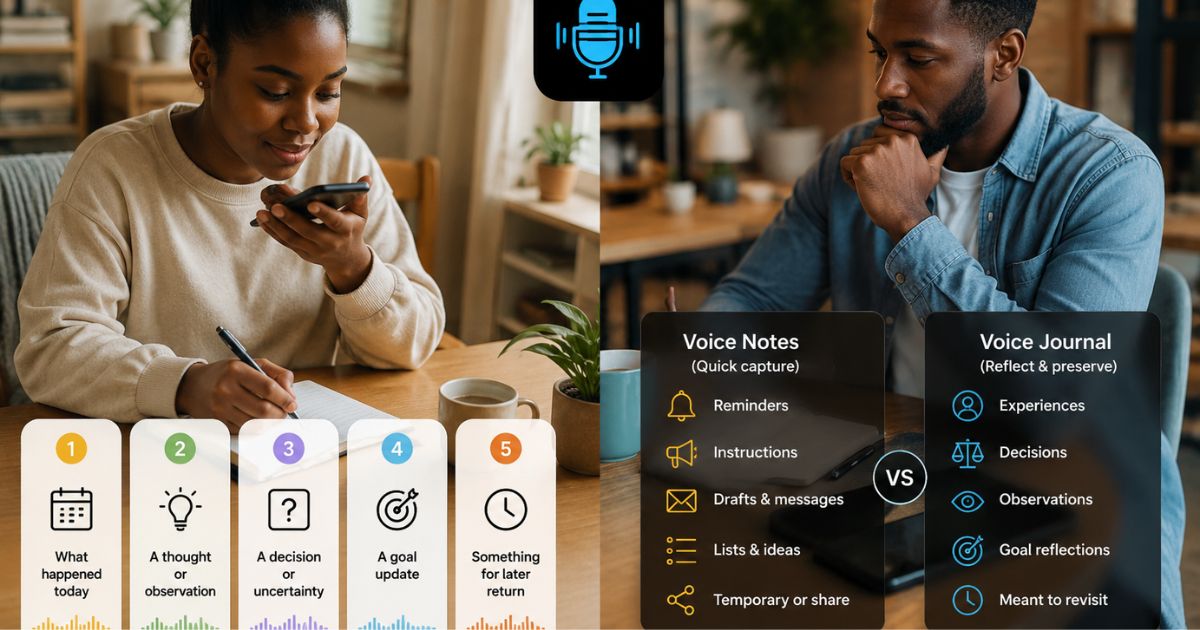
voice journal vs voice notesvoice journal vs voice memoaudio journalingvoice notesvoice journal
A voice journal entry and a voice note can begin in exactly the same way: you tap record and speak.
The difference is not automatically visible in the audio file. It does not come from the microphone, the file format, the length of the recording, or whether an app adds a title or transcript.
A useful voice journal vs voice notes comparison starts with the person’s purpose. Why are they recording? How does this recording relate to earlier ones? Do they intend to preserve it? Will they return to it as part of an ongoing account of their life, work, goals, or decisions?
Sometimes a normal voice note is the better tool. Sometimes a continuing voice journal is more useful. Many people can reasonably use both.
The same recording can serve different purposes
Imagine two people recording while walking.
One says:
“Buy printer paper, send the revised file, and call Sam before five.”
The recording is a practical reminder. It may be useful for a few hours and then disposable.
The other says:
“I keep postponing the revised file because I am trying to solve every problem before I send the first version. I want to remember that this happened again.”
That recording is reflective. The person may want to keep it, connect it to similar experiences, or revisit it later.
But even this contrast is not absolute. A shopping reminder may be preserved for a meaningful reason, and a thoughtful recording may still be deleted after it serves its purpose.
The category comes from the user’s intention and practice, not from a rule that labels one kind of audio intelligent and the other meaningless.
A voice note is often designed for quick utility
Voice notes are useful because speaking can be faster or more convenient than typing.
Common purposes include:
- a shopping or packing reminder
- spoken instructions
- a draft message
- a list
- a quick idea captured while walking
- a temporary explanation
- a recording intended to be shared
- a reminder that will be deleted after use
These recordings do not need to be reflective. Their value may come from speed, accuracy, or convenience.
A normal recording app may also provide substantial organisation. Apple’s current Voice Memos documentation, for example, describes folders and favourites, renaming, recording-name search, and transcript search, editing recordings, and keeping recordings available across supported Apple devices through iCloud. That is why “voice note” should not be treated as a synonym for “unorganised audio.”
Capabilities vary by product. Some recorders are intentionally simple; others include transcription, search, folders, editing, cloud syncing, and sharing.
A voice journal is usually designed for continuity
A voice journal is an ongoing personal record created through spoken entries.
The recordings may cover experiences, decisions, observations, goals, questions, relationships, projects, or changes in perspective. What connects them is not necessarily a folder or technical feature. The connection often comes from continuity: the person is preserving moments that relate to their life across time.
A single recording can become part of a journal when the person intentionally keeps it within that continuing record.
That means a general recorder can hold a genuine journal. It also means that a recording made inside a journaling app is not automatically meaningful. The app can support the practice, but the user supplies the purpose.
Compare the workflows through five questions
Rather than asking which app category is superior, ask five questions about the recording.
1. Why am I making it?
A voice note often solves an immediate practical need.
A voice-journal entry usually preserves an experience, interpretation, uncertainty, or point of view.
Consider a project.
A voice note might say:
“Send the draft to Leah by Thursday.”
A journal entry might say:
“This is the third time I have delayed sending a draft because I want it to feel finished. I want to record what I am worried will happen if I send it early.”
Both are useful. They solve different problems.
2. Does it stand alone or belong to a continuing record?
Many voice notes are isolated. You record them, use them, and move on.
Journal entries often gain additional meaning beside earlier and later entries. A recurring project reflection can show what you expected at the beginning, what changed during the work, and what you thought after completion.
This does not require the app to detect a pattern. The continuity exists because you made related recordings and chose to preserve them.
3. How much reflection is involved?
Reflection means examining what happened, what it meant to you, what remains unresolved, or what you want to remember.
A voice note can contain reflection. A draft message may reveal your reasoning. Spoken instructions may include lessons from previous mistakes. A quick idea may become the beginning of a larger personal record.
A journal entry normally has reflection as part of its purpose, but it does not need to be emotionally deep. A factual project update can be reflective when you preserve why the update matters or what you noticed.
4. Do I intend to preserve and revisit it?
A packing reminder may lose its value after the trip.
A journal entry is more likely to be kept because the person expects that returning to it could restore context. They may want to remember what they believed before a decision, how a project felt midway through, or why a goal mattered at a particular time.
Revisiting is an intention, not an automatic feature. Saving audio does not guarantee that the person will return, and an app cannot decide what a recording will mean later.
5. Will I still understand its context later?
A useful voice note may only need enough detail for today.
A continuing journal benefits from retained context: the date, the situation, the people or project involved, and why the moment mattered. Without that context, a recording may become difficult to recognise.
Some apps provide titles, transcripts, folders, search, summaries, or other orientation tools. Those features can support either voice notes or journals. They do not define the category by themselves.
Quick comparison
The table describes common workflows, not strict definitions.
Organisation does not belong to one category
It is tempting to say that voice notes are random while voice journals are organised. That comparison is inaccurate.
A recorder may let the user:
- rename recordings
- place them in folders
- mark favourites
- search titles
- search transcripts
- edit audio
- sync recordings across devices
Apple Voice Memos is one current example of a general-purpose recorder with several of these capabilities.
At the same time, a dedicated journaling app may intentionally avoid folders, manual tags, or editable transcripts. It may organise around dates, entries, prompts, or other journaling workflows instead.
The presence of search or folders does not make a recording a journal entry. The absence of those features does not make it meaningless.
Generated context can help without defining the journal
Some voice-journaling apps process a recording and generate orientation context.
In JournPad, the original audio remains the primary record. After saving, generated context may include a title, summary, subject, category, environment information, and a follow-up prompt. A temporary transcript is used during processing and discarded.
These generated fields can help a user recognise an entry later. They do not replace the recording, decide what the entry means, or turn unrelated recordings into a journal automatically.
The fields are view-only. They should not be described as editable metadata, searchable tags, filters, folders, or a complete sorting system.
A normal recorder may use a different model: editable titles, folders, transcripts, or search. Neither workflow is universally superior.
Goal reflection is different from a task reminder
The distinction becomes clearer when the same subject appears in two recordings.
A utility note might say:
“Renew the domain on Monday.”
That is a task reminder.
A goal-related journal entry might say:
“I am rebuilding the website this month. I finished the landing page, but I keep avoiding the pricing section because I have not decided how to explain the plans.”
The second recording preserves the person’s view of the goal at that moment.
In JournPad, a new recording deliberately created from inside a goal is linked to that goal. Entries linked to the same goal can be played through the goal-specific playlist. An existing entry should not be described as manually attachable later.
JournPad does not automatically score the goal, detect progress, compare reflections, or decide whether the user is succeeding.
When a normal voice note is the better tool
Use a general voice note when the main need is quick utility.
Examples include:
- a packing list you will use once
- instructions that need to be shared
- a draft message you plan to rewrite
- a temporary reminder
- an audio sample for another project
- a quick idea that does not yet belong to a continuing journal
- a recording that needs editing, exporting, or a product-specific sharing workflow
A dedicated journal can add unnecessary structure to these tasks.
The better tool is the one that supports the actual job without forcing the recording into a reflective practice it does not need.
When a voice journal is the better tool
A journal is useful when you want to preserve continuity and return.
Examples include:
- recurring reflections during a long project
- the reasoning behind an important but non-emergency decision
- observations you want to reconsider later
- updates connected to a personal goal
- accounts of experiences you do not want reduced to a task list
- questions that may remain unresolved for a while
A journal gives these recordings a continuing home. The user can return by date, context, or another supported structure rather than treating each file as an isolated utility item.
In JournPad, entries can be browsed through Day, Week, and Month views and replayed individually. These are date-browsing views, not arbitrary playlists.
For a practical guide to recognising an entry before replay, see How to Revisit a Voice Journal Entry Before Replaying It.
When using both makes sense
There is no need to force every spoken recording into one system.
Utility recorder plus project journal
Use a recorder for temporary instructions, quick drafts, and files you need to share. Use a journal for recurring reflections on what the project is teaching you and what you want to remember after it ends.
Task reminder plus goal reflection
Keep “submit the application Friday” in a reminder or voice-note tool. Keep a separate journal entry about why the application matters, what concerns you, and what you want to remember during the process.
Quick idea plus later reflection
Capture a sudden idea while walking in the fastest available recorder. Later, decide whether it belongs in the journal. Do not assume every captured idea must become a reflective entry.
Using both keeps quick capture quick while preserving a separate place for recordings meant to form an ongoing record.
Length does not decide the category
A ten-second recording can be part of a journal. A twenty-minute recording can be a utility note.
Length describes duration, not purpose.
JournPad allows one recording to be up to five minutes. This is a maximum, not a recommendation and not a definition of a journal entry.
For a practical way to decide when a reflection has captured enough, see How Long Should a Journal Entry Be? A Practical Test.
Choosing a voice-journaling tool
Voice-journaling products differ in what speaking creates, whether original audio is retained, how entries are revisited, which platforms support recording, and how pricing works.
Best Voice Journaling Apps in 2026: Which One Fits Your Needs? compares five current approaches without declaring a universal winner.
JournPad is a dedicated voice-first journal. It retains the original audio, supplies lightweight generated context, supports individual playback and date browsing, and supports deliberate goal-linked recording.
A new JournPad recording requires internet access to save. The temporary transcript is discarded. The generated fields are view-only and are not a general search, folder, tagging, filtering, or editing system.
Those boundaries matter because the fair comparison is not “smart journal versus basic recorder.” It is one workflow designed for continuing reflection and another often designed for flexible audio capture.
What is the real difference?
The difference between a voice journal and a voice note is not simply “audio note versus audio journal.”
Ask what you intend to preserve.
A voice note may be the right tool for a reminder, list, instruction, message, draft, or temporary idea. A voice journal may be the right tool when the recording belongs to an ongoing account of your experiences, decisions, observations, projects, or goals.
A recording in a general recorder can become part of a journal. A recording inside a journal app can remain a one-off capture.
Purpose, continuity, reflection, preservation, retained context, and intention to return are what make the distinction useful.
And sometimes the most accurate answer is to keep both.